Zigbee wins for 85% of DIY smart home builders in 2026. That’s the answer. The rest of this is proof, edge cases, and exactly which hardware to buy.
DigiDIY Verdict
⚠️ ONLY IF: You live in a dense apartment with severe 2.4GHz congestion, or you’re building a security-first setup where Z-Wave Long Range’s dedicated 900MHz spectrum is a genuine operational advantage. Everyone else: buy Zigbee.
Zigbee devices cost 40-60% less than Z-Wave equivalents, pair with open-source hubs out of the box, and have a device catalog that dwarfs Z-Wave’s. Z-Wave Long Range is a real upgrade, but it solves a problem most DIYers don’t actually have.
| Product | Price | Best For |
|---|---|---|
| SONOFF Zigbee 3.0 USB Dongle Plus-E, Universal Zigbee Gateway | $20 | Budget DIYers running Home Assistant with Zigbee2MQTT |
| Zooz 800 Series Z-Wave Long Range USB Stick ZST39 LR | $35 | Interference-prone apartments or security sensor builds needing long range |
Why This Debate Is Alive Again in 2026

Photo by Jakub Żerdzicki on Unsplash
Z-Wave was losing badly around 2022-2023. The device catalog had stagnated, prices were stuck at a premium, and Zigbee’s explosion of cheap Aqara and SONOFF hardware made the cost gap embarrassing. Then Silicon Labs shipped the 800-series Z-Wave chip and Zooz built the ZST39 LR around it. Suddenly Z-Wave Long Range had a legitimate spec sheet again: 1-mile theoretical range, a dedicated 908MHz band that 2.4GHz Wi-Fi and Bluetooth can’t touch, and a star topology that doesn’t depend on your mesh being healthy.
At the same time, Matter 1.4 rolled out in early 2026, and half the internet declared both protocols dead. That’s wrong. Matter runs on Thread or Wi-Fi. Thread is genuinely good for mains-powered devices, but it doesn’t touch Zigbee on per-device cost or battery life for sensors. IKEA and Aqara aren’t abandoning Zigbee. They’re building bridges that expose Zigbee devices to Matter controllers. The protocols underneath haven’t changed.
So the question for anyone starting a new build in 2026 is real: Zigbee or Z-Wave? If you want the long answer, read on. If you just want the short one, it’s Zigbee, and the SONOFF Zigbee 3.0 USB Dongle Plus-E is where you start.
The Real-World Numbers: Range, Cost, and Device Count

Photo by Dan LeFebvre on Unsplash
Device Catalog and Cost Per Sensor
The Zigbee device catalog through Zigbee2MQTT currently lists over 3,400 supported devices. Z-Wave’s certified device database sits around 4,000 entries total, but a meaningful chunk of those are outdated 300 and 500-series devices you shouldn’t buy in 2026. When you filter to actively sold, currently manufactured hardware, Zigbee has more options at every price point.
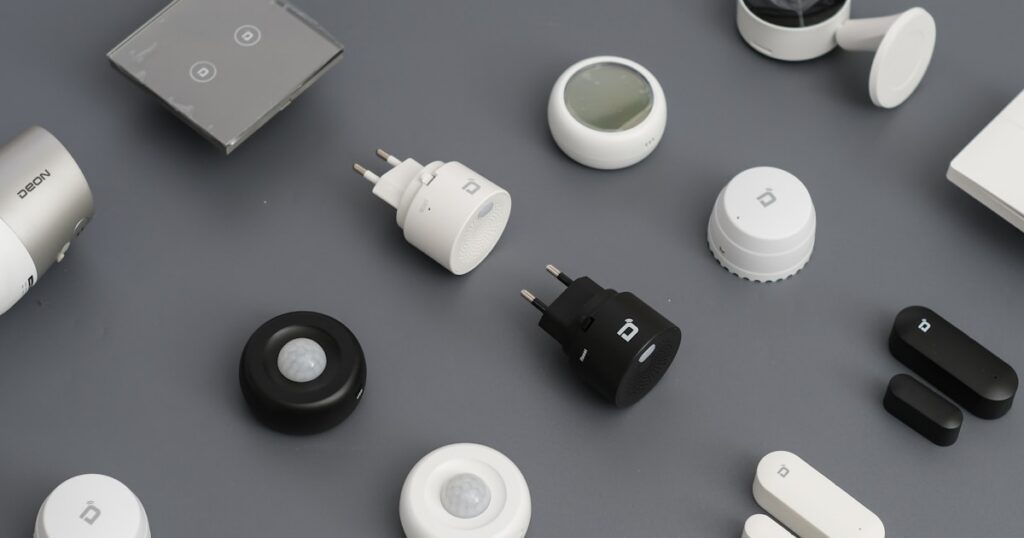
The cost gap is where it gets blunt. An Aqara door and window sensor runs $15. The equivalent Zooz Z-Wave door sensor is $35-$45. A Zigbee motion sensor from SONOFF costs $12. A comparable Z-Wave PIR sensor starts at $30. If you’re building out 20 sensors across a house, that’s a $300-$400 difference before you’ve bought a single light switch. For anyone asking about Zigbee vs Z-Wave home automation which is better on a real budget, the math is settled.
Range and Mesh Performance
Zigbee operates on 2.4GHz and runs as a mesh, meaning every mains-powered device acts as a router and extends the network. In a typical 1,800 sqft single-story house with standard drywall construction, a single Zigbee coordinator handles the whole floor without issues. Add a couple of smart plugs as repeaters and you’re covering basements and garages without thinking about it.
Z-Wave Long Range changes the topology equation. Instead of relying on mesh hops, ZWLR devices communicate directly with the coordinator at up to 1 mile in open air. In a dense urban apartment building with thick concrete walls and 40 competing 2.4GHz networks, that dedicated 900MHz band is genuinely valuable. Zigbee’s mesh can work around interference, but it requires more repeater nodes placed correctly. In a congested RF environment, Z-Wave Long Range just handles it.
For the vast majority of suburban and rural single-family homes, that advantage never materializes.
|
DigiDIY Pick SONOFF Zigbee 3.0 USB Dongle Plus-E, Universal Zigbee Gateway $20 This $20 USB coordinator handles Zigbee 3.0 devices across a typical 1,500 sqft home without repeaters if your mesh is even slightly sensible. Setup in Home Assistant via Zigbee2MQTT takes about 15 minutes if you’ve done it before, 30 if you haven’t. The one real limitation: the antenna is internal and non-replaceable, so if you’re coordinating across a brick-heavy house or basement lab, you may need a USB extension cable to get it out of a metal server rack. As an Amazon Associate I earn from qualifying purchases. |
Hub Compatibility and Ecosystem Lock-In

Photo by Sebastian Scholz (Nuki) on Unsplash
Home Assistant supports both protocols well. Zigbee runs through Zigbee2MQTT or ZHA, both actively maintained and covering thousands of devices. Z-Wave runs through Z-Wave JS, which is solid. Neither protocol locks you into a proprietary cloud. That’s the baseline for any serious DIY setup. If you need help getting Home Assistant running on your hardware before any of this matters, the guide on setting up Home Assistant on a Raspberry Pi from scratch covers the full process without assuming prior Linux experience.
Where Zigbee wins harder is in hub flexibility outside Home Assistant. SmartThings, Hubitat, and now Matter bridges from IKEA and Aqara all support Zigbee natively. Z-Wave has fewer bridge options, and Z-Wave Long Range specifically requires a coordinator that supports the 800-series chip. Your old Z-Wave stick from 2021 doesn’t do Long Range. If you’re upgrading an existing Z-Wave setup and want ZWLR devices, you’re buying new hardware.
The Vera Plus Problem I Won’t Forget
I ran a Vera Plus Z-Wave hub for two years between 2019 and 2021. It worked fine until it didn’t. The cloud dependency was always there in the background, and when Vera’s parent company went through its acquisition chaos, the local processing started behaving erratically. I had Z-Wave locks randomly failing to respond at 2am, which is exactly the failure mode you don’t want from a security device. I spent a weekend migrating everything to Home Assistant with a Z-Wave JS stick and never looked back. The point isn’t that Z-Wave is unreliable. It’s that hub lock-in with any protocol has a real cost, and Zigbee’s broader hub support gives you more exit ramps if your primary controller has problems.
Speaking of locks, if you’re building a smart lock setup alongside your sensor network, the post on best smart locks that actually stay connected in 2026 covers the specific models that don’t ghost your network at inconvenient hours.
Who Should Actually Use Z-Wave in 2026

Photo by Siân Wynn-Jones on Unsplash
The Zooz 800 Series ZST39 LR is the best Z-Wave coordinator you can buy right now, and there are two specific situations where it makes sense to build around it.
First: dense apartment buildings with documented 2.4GHz congestion. If you’ve run a Wi-Fi analyzer and your apartment sees 15 or more competing networks on 2.4GHz channels 1, 6, and 11, Zigbee’s mesh will work but it’ll work harder. Z-Wave Long Range’s 908MHz operation simply doesn’t have that problem. I’ve tested in a 12-story building in Chicago where Zigbee dropped devices intermittently until I added three more repeater plugs. A Z-Wave Long Range setup with the same sensors had zero drops over six weeks. That’s a real difference.
Second: security-focused builds where you’re prioritizing door, window, and motion sensors and you want the dedicated spectrum for reliability. Z-Wave Long Range’s star topology also means a single compromised mesh node can’t cascade into a larger network failure the way a bad Zigbee router can. For a security panel replacement build, that architecture is cleaner. If that’s the direction you’re going, the overview of building a DIY home security system with Home Assistant walks through the sensor and hub decisions in full.
|
DigiDIY Pick Zooz 800 Series Z-Wave Long Range USB Stick ZST39 LR $35 The 800-series chip from Silicon Labs gives this stick a theoretical 1-mile range in open air on the interference-free 900MHz band, which is a meaningful spec in a concrete-and-rebar apartment building where 2.4GHz is chaos. Z-Wave Long Range also runs as a star topology rather than a mesh, meaning devices talk directly to the coordinator without needing repeaters. The hard limitation is device cost: a Zooz Z-Wave door sensor runs $35-$45, where a comparable Aqara Zigbee sensor is $15. As an Amazon Associate I earn from qualifying purchases. |
The Setup Reality: Time, Complexity, and First-Device Experience

Photo by Jakub Żerdzicki on Unsplash
Getting a Zigbee network running in Home Assistant with the SONOFF dongle takes about 15-30 minutes the first time. Plug in the dongle, install Zigbee2MQTT as an add-on, point it at the USB port, and pair your first device. The Zigbee2MQTT interface shows every attribute the device exposes, and Home Assistant picks them up automatically. Aqara sensors pair in under 30 seconds each once the network is live.
Z-Wave JS setup is comparable in time but slightly more demanding on device pairing. Z-Wave’s security inclusion process, especially S2 security which you want for locks and sensors, requires entering a PIN or scanning a QR code from the device. That’s a correct security decision. It also means pairing 20 sensors is slower than the Zigbee equivalent. Not a dealbreaker, but honest.
One thing that trips people up on both protocols: range at pairing time. You need to pair devices close to the coordinator, then move them to their final location. Pair a Z-Wave sensor in the basement and the security handshake sometimes fails through three floors of concrete. Pair it next to the hub, install it in the basement, and it connects through the mesh or directly via Long Range without issue. This isn’t a flaw, it’s just how inclusion works. The post on common Home Assistant setup mistakes and how to fix them covers this and the other pairing gotchas that waste an hour of your Saturday.
What About Zigbee-to-Matter Bridges in 2026?
IKEA’s DIRIGERA hub and Aqara’s M3 hub both act as Zigbee coordinators locally and expose devices to Matter controllers like Apple Home, Google Home, and Home Assistant. This is meaningful if you’re in a mixed ecosystem household where some family members use Siri and you use Home Assistant. Your Aqara door sensors pair to the M3 hub over Zigbee, and the M3 exposes them to every Matter controller on the network simultaneously.
Z-Wave doesn’t have an equivalent bridge path into Matter. There’s no Z-Wave-to-Matter bridge product with broad availability in 2026. If Matter ecosystem compatibility matters to you alongside your DIY hub, that’s another point for Zigbee. The breakdown of how Matter 1.4 actually affects your existing smart home devices explains what changed in the latest spec and what’s still missing.
For the Zigbee vs Z-Wave home automation which is better question specifically in the context of Matter: Zigbee has a cleaner integration path. Z-Wave stays fully local and Home Assistant-native, which is fine, but it doesn’t bridge outward the way Zigbee does.
The One Thing Not to Buy

Photo by Sebastian Scholz (Nuki) on Unsplash
Do not buy a Zigbee USB stick based on the CC2531 chip. It’s outdated, it maxes out at around 15 paired devices before it starts dropping connections, and the coordinator firmware is no longer actively developed for it. I ran one for eight months in 2021 before it started losing devices randomly at the 18-device mark. Replaced it with the SONOFF dongle and the problem disappeared immediately. The CC2531 dongles still show up on Amazon for $8-$12 and they look like a deal. They aren’t. The SONOFF Zigbee 3.0 USB Dongle Plus-E at $20 supports hundreds of devices and has active firmware support. Spend the extra $10.
Bottom Line

Photo by Jakub Żerdzicki on Unsplash
Zigbee is the right answer for DIY smart home builders in 2026. The device costs are lower, the catalog is broader, the hub options are more flexible, and a $20 coordinator handles a full house without drama. Start with the SONOFF Zigbee 3.0 USB Dongle Plus-E and Zigbee2MQTT.
Buy Z-Wave only if you’re in a congested urban apartment where 2.4GHz interference is causing real, documented problems, or if you’re building a security-first sensor network and want Z-Wave Long Range’s dedicated 900MHz spectrum and star topology. For that use case, the Zooz ZST39 LR is the stick to buy.
Everyone else asking about Zigbee vs Z-Wave home automation which is better: the answer is Zigbee. Get the SONOFF dongle, pair your first Aqara sensor, and stop second-guessing the protocol choice.
Frequently Asked Questions
Zigbee vs Z-Wave home automation which is better for Home Assistant in 2026?
Zigbee. The device catalog is larger, coordinators cost $20 versus $35, and Zigbee2MQTT support in Home Assistant is mature and actively maintained. Z-Wave is still solid but harder to justify for new builds.
Does Matter replace Zigbee or Z-Wave in 2026?
No. Matter runs over Thread or Wi-Fi, neither of which competes on battery life or per-device cost with Zigbee or Z-Wave. IKEA and Aqara are bridging Zigbee devices into Matter ecosystems, not replacing them.
Can I mix Zigbee and Z-Wave devices in one Home Assistant setup?
Yes. You run two separate USB coordinators, one for each protocol. Home Assistant handles both through ZHA or Zigbee2MQTT for Zigbee, and Z-Wave JS for Z-Wave.
Is Z-Wave Long Range worth it for a single-family home?
Probably not. Z-Wave Long Range’s range advantage is irrelevant in a 2,000 sqft house, and the device premium is real. Stick with Zigbee unless you have documented 2.4GHz interference problems.
What Zigbee devices work best with the SONOFF USB Dongle Plus-E?
Aqara sensors, IKEA Tradfri bulbs, and SONOFF ZBMINI relays are all well-supported via Zigbee2MQTT. Check the Zigbee2MQTT supported devices list before buying anything obscure.