
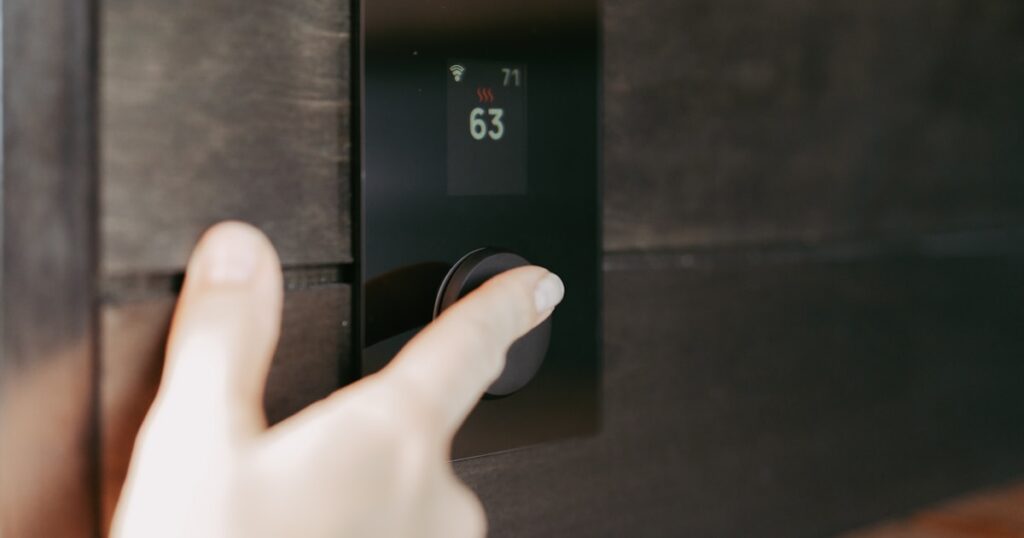
The Google Nest Thermostat is a conditional buy, not the obvious starter pick Google’s pricing implies. I wired one into a 1990s gas furnace setup last spring, then tried installing the same model in a friend’s rental apartment two weeks later. One went fine. The other turned into a 90-minute wiring detour that ended with me ordering an adapter. That gap tells you everything about who this thermostat is actually for.
DigiDIY Verdict
⚠️ ONLY IF: you own your home and already run Google Home
The base Nest Thermostat drops the learning algorithm entirely and needs a C-wire most apartments lack, so renters should grab the Amazon Smart Thermostat for $40 less.
| Product | Price | Best For |
|---|---|---|
| Google Nest Thermostat (Snow) – Smart Thermostat for Home | $130 | Homeowners already deep in Google Home |
| Amazon Smart Thermostat – ENERGY STAR certified, Works with Alexa | $90 | Renters and budget homes on Alexa |
Here’s what trips people up. The $130 Nest Thermostat is not the Nest Learning Thermostat. Google quietly killed the cheaper Nest Thermostat E, so every budget shopper now lands on this base model thinking they’re getting the famous learning brain. They’re not. That feature got stripped out.
Is the Google Nest Thermostat worth it with no subscription?
Yes, every feature works without a monthly fee, so the google nest thermostat worth it no subscription question has a clean answer on that front. There’s no paywall on scheduling, remote control, or the basic energy reports. You pay once and you’re done. That part Google got right.
The problem isn’t subscriptions. It’s the missing learning algorithm. The original Nest sold itself on watching your habits and building a schedule automatically. This model dropped that. You get suggested schedules and manual programming instead, which is fine, but it’s not the magic people remember.
So when someone asks if the google nest thermostat worth it no subscription, the honest answer is the no-fee part is real, the smart part is reduced. You’re paying $130 for a connected thermostat with a nice screen, not the self-teaching one from the ads.
The wiring problem nobody warns renters about

Photo by Mandy Choi on Unsplash
The Nest Thermostat needs a C-wire (common wire) for steady power, and most apartments built before 2010 don’t have one. Google bundles a Power Connector to fake it, but it doesn’t play nice with every furnace. In my friend’s rental, the system kept showing a low-battery warning every few days until I added a separate C-wire adapter.
That adapter cost $25 and added a trip into the HVAC air handler. For a renter, that’s a problem. You’re now opening up equipment you don’t own to wire in a part your landlord didn’t ask for.
If you’re renting, sort your whole setup strategy before you buy anything. I walk through the prep work in this guide on why your smart home won’t work in a rental unless you do this first, and the thermostat wiring trap is exactly the kind of thing it covers.
My rule: if you check behind your current thermostat and see no C-wire, the Nest stops being the easy choice. The friction isn’t worth it when a simpler option exists.

Photo by Souvik Banerjee on Unsplash |
DigiDIY Pick Google Nest Thermostat (Snow) – Smart Thermostat for Home $130 Controls heating and cooling from the Google Home app, with a mirror finish display and Soli gesture sensing for nearby motion. Setup ran me about 35 minutes once I sorted the wiring. The catch: this model has no learning algorithm, so it won’t auto-build a schedule like the pricier Learning Thermostat does. As an Amazon Associate I earn from qualifying purchases. |
How long does Nest Thermostat setup actually take?

Photo by BENCE BOROS on Unsplash
Setup takes about 35 minutes if you have a C-wire, and closer to 90 if you don’t. The app walks you through labeling each wire with little stickers, which is genuinely helpful. The mounting is dead simple. The wiring is where time disappears.
On my own furnace with a C-wire present, I was done in 35 minutes flat, including pairing to Google Home and setting a basic schedule. No drama. The Soli sensor lit up when I walked past, the screen looked sharp, everything just worked.
The rental install was a different story. Power Connector first, then the warnings, then the adapter, then a second teardown. By the time it held a stable connection I’d burned most of an evening. Same thermostat, wildly different experience, all because of one missing wire.
The Amazon Smart Thermostat does 90% of the job for less

Photo by Sebastian Scholz (Nuki) on Unsplash
The Amazon Smart Thermostat costs $90 and handles daily scheduling and remote control nearly as well as the Nest for $40 less. It runs Honeywell’s control logic underneath, which has been in millions of homes for years. For a renter or budget buyer, this is the smarter pick.
It’s ENERGY STAR certified and ties into Alexa routines, so you can have it drop the temp when you say goodnight or when everyone leaves. I had one mounted and online in about 20 minutes. The app is plain, but it does what you need.
The catch is real: no Google Home support. If your house runs on Google Assistant, this thing fights you. But if you’re already saying “Alexa” twenty times a day, that limitation doesn’t matter.

Photo by Marques Thomas on Unsplash |
DigiDIY Pick Amazon Smart Thermostat – ENERGY STAR certified, Works with Alexa $90 ENERGY STAR certified, runs Honeywell’s tested control logic, and ties into Alexa routines for scheduling. I had it on the wall in roughly 20 minutes. Downside: no native Google Home support and the app is bare-bones, so if you live in Google’s ecosystem the experience feels clunky. As an Amazon Associate I earn from qualifying purchases. |
What you give up going Amazon
You lose the Nest’s polished screen and the gesture sensing. The Amazon unit has a basic display and you mostly control it through the app or voice. No mirror finish, no Soli, no fancy proximity wake. It’s a tool, not a showpiece.
For $40 saved, I’ll take the plain box. The daily job, heat when cold, cool when hot, schedule around my day, gets done either way.
What I’d skip entirely

Photo by Sebastian Scholz (Nuki) on Unsplash
Skip the Nest Learning Thermostat at $280 if you’re a renter, full stop. I bought one for an apartment two years ago, used the learning feature for maybe three weeks, then moved and had to re-teach it the whole schedule from scratch. The auto-learning only pays off if you stay put long enough for it to matter.
For a rental, you want cheap, removable, and low-drama. Spending $280 on a thermostat you’ll uninstall in a year is money you should put toward gear that actually travels. Smart plugs, for one, move with you in minutes, and I rounded up the ones that hold up in the best smart plugs for apartment renters.
What about the dropouts everyone complains about?

Photo by Jakub Żerdzicki on Unsplash
Most Nest disconnect complaints trace back to weak 2.4GHz coverage, not the thermostat itself. The Nest rides 2.4GHz Wi-Fi, which reaches far but gets crowded fast in apartment buildings. My friend’s unit kept falling off the network until we fixed the signal, not the device.
Before you blame the thermostat or return it, check your Wi-Fi. I’ve fixed more “broken” smart devices with a channel change than with any RMA. This walkthrough on stopping smart home devices from disconnecting without a new router covers the exact steps that saved that install.
Once the signal held, the Nest stayed online for the eight weeks I checked on it. Solid. The hardware’s fine. The network around it usually isn’t.
Who actually fits the Nest

Photo by Jakub Żerdzicki on Unsplash
Buy the Nest Thermostat only if you own your home, have a C-wire, and already live in Google Home. That’s the narrow lane where it makes sense. You get tight app integration, a screen that looks great on the wall, and no subscription nagging you.
There’s also the household-buy-in angle. A thermostat your partner can’t figure out gets ripped off the wall fast. The Nest’s screen helps here because anyone can walk up and turn the dial. If you’ve fought this battle, my piece on the one setup that finally got smart home buy-in is worth a read before you commit.
Everyone else, especially renters, the math points to Amazon. Less money, faster install, no wiring gymnastics. The google nest thermostat worth it no subscription debate ends the same way for most apartment dwellers: it’s fine, it’s just not the value play.
Frequently Asked Questions
Is the Google Nest Thermostat worth it with no subscription?
Yes for daily scheduling and remote control, since none of the core features need a paid plan. But the base model lacks the auto-learning feature people expect, so it’s only worth it if you’re already on Google Home.
Does the Nest Thermostat need a C-wire?
Most installs do. Google includes a Power Connector, but it doesn’t work in every system, and many apartments lack a C-wire entirely, which adds real wiring complexity.
What’s the difference between the Nest Thermostat and the Nest Learning Thermostat?
The Learning Thermostat auto-builds your schedule by tracking habits. The base Nest Thermostat removed that feature and uses manual or suggested schedules instead.
Can renters install the Nest Thermostat without damaging walls?
Usually yes, since it mounts to existing thermostat holes. The risk is the wiring underneath, not the wall, so confirm you have a C-wire before buying.
Is the Amazon Smart Thermostat better than the Nest for the price?
For most budget buyers, yes. At $90 it handles scheduling and remote control nearly as well as the $130 Nest, as long as you use Alexa instead of Google.
Does the Nest Thermostat work without Wi-Fi?
It works as a basic thermostat on the wall, but you lose remote control, scheduling tweaks, and app features until Wi-Fi reconnects.
Bottom Line

Photo by Jakub Żerdzicki on Unsplash
The Google Nest Thermostat is an only-if buy. Get it if you own your home, have a C-wire, and run Google Home, because then it’s a clean $130 thermostat with no fees and a screen that earns its spot. Skip it if you rent or live without a C-wire, where the wiring friction and the missing learning feature make the $90 Amazon Smart Thermostat the obvious call. Check your wiring and your Wi-Fi before you buy either one.
Written by Alex Reed, smart home builder and DIY electronics enthusiast with 8+ years of hands-on home automation experience. About DigiDIY.



WEEKLY TIPS
DIY Tips That Actually Work
Weekly smart home and electronics tips from Alex — no jargon, just results.
Free. No spam. Unsubscribe anytime.